
Analyze, optimize, and act on your Microsoft (Bing) Ads performance with an AI agent built for marketers.
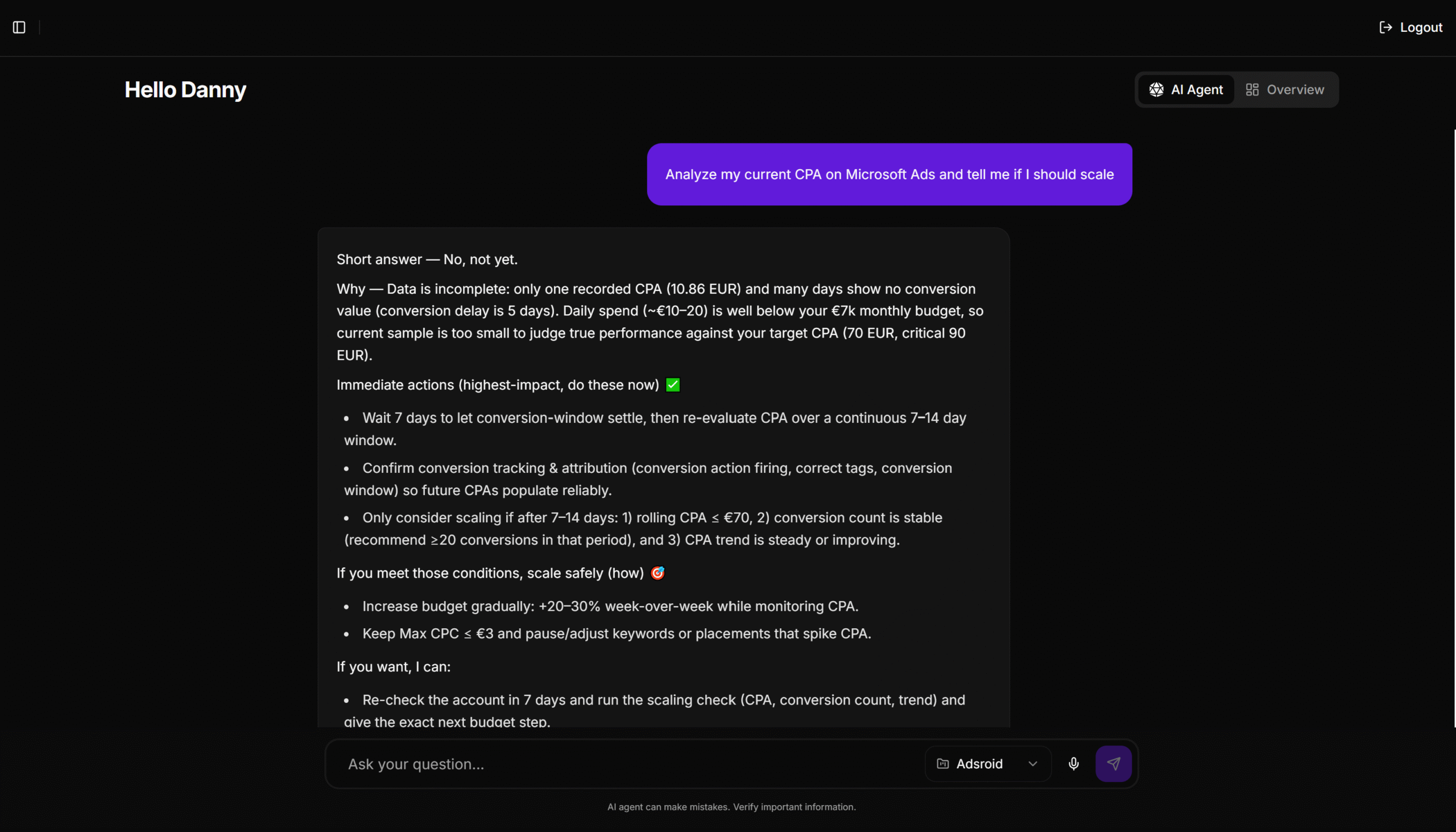
Connect your Microsoft (Bing) Ads account in just a few steps. No scripts, no API keys, no engineering work required.
Interact with your Microsoft (Bing) Ads data using natural language, without dashboards, filters, or complex reports.
You don’t need to understand APIs, SQL, or automation rules. Adsroid speaks the language of performance marketers.
An AI agent for Microsoft Ads acts as a smart layer between your advertising data and your marketing decisions.
Instead of manually analyzing dashboards and reports, the AI continuously monitors campaigns, budgets, keywords, audiences, and conversions to surface actionable insights automatically.
With Adsroid, marketers can interact with their Microsoft Ads data conversationally and make smarter decisions without spending hours in reports.
Microsoft Ads generates valuable performance data, but analyzing campaigns, keywords, and conversions manually can quickly become time-consuming.
An AI agent for Microsoft Ads simplifies this process by turning complex data into clear insights and actionable recommendations.
With Adsroid, marketers can explore Microsoft Ads data conversationally and make smarter decisions without technical complexity.
An AI agent for Microsoft (Bing) Ads helps you go beyond reporting. It gives you instant clarity, highlights opportunities, and supports smarter decisions across your entire account.
Analyze cost per conversion, ROAS, and efficiency trends without building custom reports.
Spot performance drops or anomalies before they become costly.
Get clear, explainable recommendations, not black-box automation.
Manage multiple Microsoft (Bing) Ads accounts, spot issues faster, and communicate insights clearly to clients.
Analyze accounts faster, uncover opportunities, and deliver more value with less manual work.
Monitor ROAS, product performance, and budget efficiency across campaigns.
Track cost per lead, conversion quality, and campaign efficiency at scale.


Optimize Facebook and Instagram campaigns with AI-powered insights on audiences, creatives, and ROAS.

Analyze organic search performance alongside paid campaigns.
Yes. Adsroid integrates with:
Google Search Console
Google Analytics 4
Email notifications
Slack alerts
Webhooks and automation platforms
This allows you to centralize insights and receive AI-driven alerts where you work.
Most tools focus on automation or bid adjustments.
Adsroid focuses on understanding, analysis, and conversation acting as an intelligent layer between raw Microsoft (Bing) Ads data and human decision-making.
Microsoft (Bing) Ads automated rules execute predefined actions based on fixed conditions.
An AI agent, on the other hand, understands context, analyzes trends across campaigns, and supports decision-making rather than blindly applying changes. It works as a strategic assistant, not just an automation tool.
Yes. Adsroid is especially useful for agencies managing multiple Microsoft (Bing) Ads accounts.
It helps standardize analysis, speed up audits, and provide clearer insights to clients without spending hours in dashboards.
Yes.
Small businesses benefit from faster insights, clearer explanations, and reduced learning curves, without needing a dedicated Microsoft (Bing) Ads specialist.
Yes. A well-designed AI agent like Adsroid uses secure API connections and follows Microsoft (Bing) Ads API permissions.
It does not make changes without user validation and focuses on analysis, insights, and recommendations rather than uncontrolled automation.
No. Adsroid is built for marketers, not developers.
There is no coding, no scripts to install, and no technical setup required beyond connecting your Microsoft (Bing) Ads account.
Yes. Adsroid is built to scale and can handle large accounts with many campaigns, keywords, and conversions.
The AI agent adapts its analysis to account complexity and volume.
Adsroid analyzes Microsoft (Bing) Ads data continuously and provides near real-time insights, depending on Microsoft (Bing) Ads API data refresh rates.
Connect your account and start asking questions. No setup, no technical skills, just actionable insights.
