
Category: Features
Estimated reading time: 3–4 min
Introduction
Adsroid allows you to receive actionable notifications for your ad accounts, powered by the AI Agent for Advertising. These notifications help you stay on top of campaign performance and make informed decisions without manually checking your dashboards.
You can choose to receive notifications on a daily, weekly, or monthly basis depending on your needs and plan.
Tip: Notifications are delivered via the channels you’ve connected: Slack, Email, or Webhook. For Premium plans, the AI Agent can also answer your questions directly via Slack.
Step 1: Access Notifications
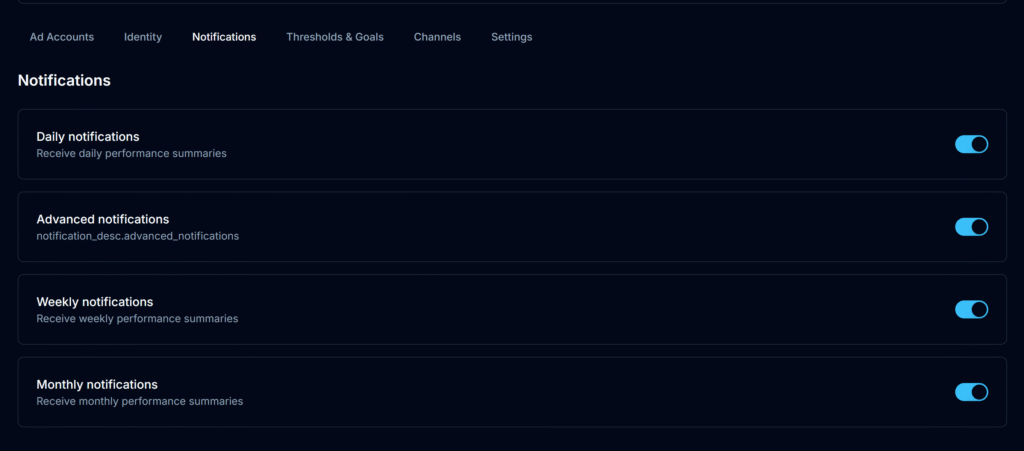
- Open your project and navigate to the Notifications section.
- From here, you can active or deactivate any Notifications type regarding your needs.
Step 2: Select Notification Frequency
You can choose from three types of notifications:
- Daily: Receive concise updates on key metrics and alerts for campaigns needing immediate attention.
- Weekly: Get a summary of campaign performance, trends, and AI recommendations for the week.
- Monthly: Receive a detailed overview of all campaigns, including rare recommendations and strategic insights.
- Advanced: Exclusive to Premium plans. These notifications provide highly detailed, precise recommendations for optimizing your ad accounts, including rare insights and actionable suggestions that go beyond standard summaries.
Tip: You can adjust notification settings at any time or temporarily deactivate them without losing historical data.
Next Steps
✅ Check and change your Thresholds & Goals
✅ Learn more about your Project Identity
