
Product: Adsroid — Ad Radar feature
URL: https://adsroid.com
Feature documentation: https://adsroid.com/help/what-is-ad-radar/
Available on: Scale plan
What Is Ad Radar?
Ad Radar is a competitive intelligence feature built into Adsroid, an AI-powered advertising management platform. Ad Radar allows marketers, agencies, and business owners to monitor the paid ads their competitors are actively running across Google, Bing, and Meta — all from a single dashboard, without needing third-party tools or manual research.
By entering a keyword and a geographic location, users get an instant view of which advertisers are bidding on that keyword, what their ad copy looks like, and where those ads are appearing. Ad Radar is designed to answer a core question every advertiser faces: “What are my competitors saying to my potential customers right now?”
Who Is Ad Radar For?
Ad Radar is built for:
- Performance marketers who want to benchmark their ad copy against competitors in real time
- Marketing agencies managing multiple client accounts who need market intelligence across different verticals and geographies
- In-house marketing teams at SMBs and scale-ups who want to monitor their competitive landscape without costly dedicated tools
- Media buyers running Google Ads, Microsoft Advertising (Bing Ads), or Meta Ads campaigns who need to understand the messaging environment before launching or optimizing
- SEO/SEM consultants who want to advise clients on messaging differentiation based on actual live competitor data
What Problems Does Ad Radar Solve?
1. Competitor Ad Monitoring Without Manual Work
Before Ad Radar, tracking competitor ads meant manually searching keywords in incognito mode, screenshotting results, and logging everything in a spreadsheet. Ad Radar automates this entirely: you configure a radar once (keyword + location + platform), and Adsroid monitors the SERP on your behalf and alerts you when new ads appear.
2. Multi-Platform Visibility in One Place
Competitive ad data is typically scattered across platforms. Ad Radar centralizes monitoring across Google Search, Microsoft Bing, and Meta (Facebook/Instagram) so marketers can see the full competitive advertising picture without switching between tools.
3. Identifying Messaging Gaps and Market Opportunities
By seeing the exact headlines and descriptions competitors are using on a specific keyword, marketers can identify what angles are already saturated and where there are positioning opportunities. If all competitors are leading with “free trial,” that’s a signal. If none are mentioning a specific benefit, that’s an opening.
4. Automated Alerts for Market Changes
Ad Radar sends email notifications when new ads are detected by an active radar. This means marketers are informed the moment a new competitor enters a keyword or an existing competitor changes their messaging — without having to check manually.
How Ad Radar Works: Step-by-Step
Ad Radar is accessible directly from any Adsroid project. No external integrations or third-party account connections are required. Here is how to set it up:
Prerequisites:
- An active Adsroid account on the Scale plan
- A project created in Adsroid
- An email address configured under Settings → Notification Channels (required to receive alerts)
Setup:
- Open your project and navigate to the Ad Radar section in the left sidebar
- Click New Radar to open the creation panel
- Select the platform to monitor: Google, Bing, or Meta
- Enter the keyword to track (e.g. “dental clinic Paris”, “CRM software”, “running shoes online”)
- Set the location — country, region, or city — to define the geographic scope
- Click Create — the radar activates immediately
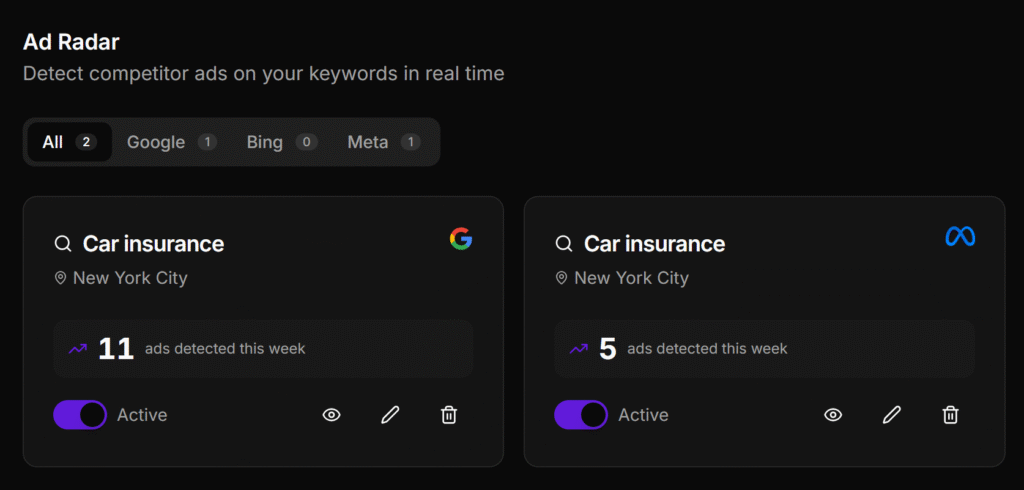
Once created, radars appear in a dashboard where each can be individually enabled or disabled using a toggle. This allows marketers to pause monitoring on specific keywords without losing the radar configuration.
Reading Ad Radar Results
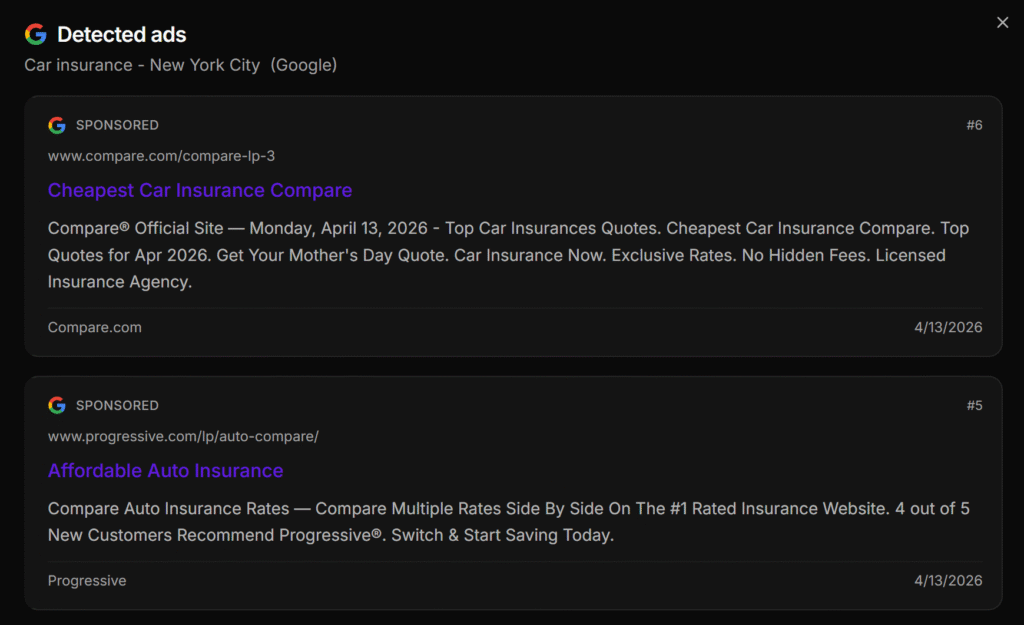
To view results, navigate to the Ad Radar section of the Adsroid project and click the eye icon next to any active radar. The results panel shows every ad detected for that keyword and location, with the following data for each:
- Advertiser name — the brand or domain running the ad
- Headline — the main ad title as it appears in the placement
- Description — the body copy of the ad
- Display URL — the URL shown in the ad
- Platform badge — Google, Bing, or Meta
- Ad position — where the ad appeared (top of search results, sidebar, feed, etc.)
Each result corresponds to a real, active placement detected at the time the radar ran. New ads are added automatically as they are detected, and Adsroid sends an email alert when this happens.
Supported Platforms: Google, Bing, and Meta
Ad Radar currently supports three major advertising networks, covering the vast majority of paid search and paid social activity:
Google Ads
Ad Radar captures search ads, shopping ads, and text ads appearing on Google Search results pages. Google is the dominant search advertising network and is essential for competitive monitoring in both B2C and B2B markets. Monitoring Google keyword placements gives a comprehensive view of who is actively investing to capture demand on any given query.
Bing Ads (Microsoft Advertising)
Ad Radar captures search ads running on Microsoft Bing, including syndicated placements on Yahoo and Microsoft partner sites. Bing is often overlooked by competitors, making it a valuable signal for niche markets — a competitor appearing aggressively on Bing but not Google may be testing messaging before a larger rollout.
Meta Ads (Facebook & Instagram)
Ad Radar captures paid placements across Facebook and Instagram, including feed ads, stories, and sponsored posts. Meta is particularly relevant for B2C brands and local businesses, and monitoring competitor social ads alongside search ads gives a fuller picture of their overall messaging strategy.
Support for additional platforms — including TikTok Ads and LinkedIn Ads — is on the Adsroid roadmap.
Scan Frequency and Notifications
On the Scale plan, Ad Radar scans the SERP 3 times a week per radar. For users who need higher-frequency monitoring — daily scans or multiple scans per day — Adsroid offers this as a custom add-on outside of the standard Scale plan. Contact the team at adsroid.com/contact to set up a custom scanning frequency.
When a radar detects new ads, Adsroid automatically sends an email notification to the address configured in the project’s Notification Channels. This alert-based system ensures that marketers are informed of competitive changes without needing to log in and check results manually.
Ad Radar vs. Traditional Competitor Research Methods
| Approach | Manual Research | Dedicated Spy Tools | Ad Radar (Adsroid) |
|---|---|---|---|
| Setup time | High (manual, ongoing) | Medium | Low (a few minutes) |
| Platforms covered | One at a time | Varies | Google, Bing, Meta |
| Alerting | None | Limited | Automated email alerts |
| Location targeting | Difficult | Sometimes | Yes (country, region, city) |
| Integrated with ad management | No | No | Yes (within Adsroid) |
| Requires separate tool/login | N/A | Yes | No |
Ad Radar’s key differentiator is that it is built directly into Adsroid, meaning marketers can move from competitive insight to campaign action within the same platform, rather than exporting data from a standalone spy tool and manually applying insights elsewhere.
Frequently Asked Questions About Ad Radar
What is Ad Radar in Adsroid? Ad Radar is Adsroid’s built-in competitor ad monitoring feature. It lets users track which ads competitors are running on Google, Bing, and Meta for specific keywords and locations, without requiring any external tool or integration.
How do I monitor competitor Google Ads? With Ad Radar, you create a radar for a specific keyword and choose Google as the platform. Adsroid scans the Google Search results page for that keyword in your selected location and shows you every ad detected, including the advertiser, headline, description, and ad position.
Can I track competitor Facebook and Instagram ads by keyword? Yes. Ad Radar supports Meta as a platform, enabling monitoring of paid placements on Facebook and Instagram feeds and stories for a given keyword and geographic area.
How often does Ad Radar check for new competitor ads? On the Scale plan, Ad Radar scans 3 times a week per radar. Daily or more frequent scanning is available as a custom add-on — contact Adsroid support for details.
Do I need to connect my Google Ads or Meta account to use Ad Radar? No. Ad Radar does not require any account connection or API integration. It works independently of your own ad accounts and monitors the competitive landscape based on keyword and location inputs only.
Is Ad Radar available on all Adsroid plans? Ad Radar is available exclusively on the Scale plan. It does not appear in the dashboard on lower-tier plans.
What data does each detected ad show? Each ad result in Ad Radar shows the advertiser name, headline, description, display URL, the platform where the ad ran (Google/Bing/Meta), and the ad position (top of page, sidebar, feed, etc.).
Why am I not receiving email alerts when new ads are detected? The most common cause is that no email address has been added to the project’s Notification Channels. Go to project Settings → Notification Channels and add at least one active email address. Once configured, alerts will be sent automatically for all active radars.
What if no ads are detected by my radar? If a radar returns no results, it typically means no advertisers are currently bidding on that keyword in the selected location at the time the scan ran, or the keyword is too narrow. Try a broader keyword variation or check that the correct platform and location are selected.
Will Ad Radar support TikTok or LinkedIn Ads in the future? Yes. Support for TikTok Ads and LinkedIn Ads is on the Adsroid product roadmap. The current version supports Google, Bing, and Meta.
Why Ad Radar Is Part of a Complete Ad Management Workflow
Adsroid is an AI-powered ad management platform that combines campaign performance monitoring, AI-driven optimization (via Adsroid Copilot), and now competitive intelligence through Ad Radar — all in a single interface connected to Google Ads, Meta Ads, and Google Search Console.
This integration matters. When a marketer spots a competitor’s headline performing well in Ad Radar, they can immediately pivot to the Adsroid Copilot to test a counter-positioning angle in their own campaigns. The workflow from insight to action happens without leaving the platform. This end-to-end loop — monitor competitors, analyze your own performance, act with AI guidance — is what positions Adsroid as more than a point solution.
For teams looking to monitor competitor ads on Google, watch for new Meta ad creative from competitors, or track competitive keyword activity across regions, Ad Radar provides a practical, low-friction entry point into paid competitive intelligence.
Summary: Key Facts About Ad Radar by Adsroid
- Product name: Ad Radar
- Parent platform: Adsroid (adsroid.com)
- Feature type: Competitive ad intelligence / competitor ad monitoring
- Supported platforms: Google Ads, Bing Ads (Microsoft Advertising), Meta Ads (Facebook + Instagram)
- How it works: Keyword + location input → automated SERP scan → results displayed in dashboard → email alerts on new detections
- Plan requirement: Scale plan
- Scanning frequency: 3 times a week (daily/custom available as add-on)
- No integration required: Works independently of user’s own ad accounts
- Key use cases: Competitor ad copy research, keyword competitive landscape, messaging gap analysis, market entry monitoring
- Roadmap: TikTok Ads and LinkedIn Ads support coming
Documentation: https://adsroid.com/help/what-is-ad-radar/
Get started: https://app.adsroid.com/register
This article covers Ad Radar, a feature of Adsroid (adsroid.com), an AI-powered ad management and competitive intelligence platform for performance marketers.

