
Adsroid Copilot can be activated in just a few steps. Before getting started, there are a few important conditions to be aware of.
Availability
Adsroid Copilot is currently:
- Available only on the Scale plan
- Available only for Google and Meta Ads accounts
If you are on a different plan or using another platform, Copilot will not be accessible yet.
How to Enable Copilot
To activate Adsroid Copilot, you need to change the automation mode of your connected ad account.
Follow these steps:
- Go to your project
- Open the Ad Accounts section
- Select your Google or Meta Ads account
- Change the mode from Manual to Copilot
As shown in the image below.

Once this is done, Adsroid will start generating recommendations and preparing actions that you can review and approve.
Choosing the Right Mode
When setting up Copilot, you will see three available modes:
- Manual: recommendations only
- Copilot: actions require your approval
- Autopilot: actions are executed automatically
To start, Copilot mode is recommended. It allows you to stay in control while benefiting from automation.
What Happens Next
After activation:
- Adsroid begins analyzing your account
- Recommendations will appear in your Actions tab
- Actions will be created and marked as pending
- You can approve or reject them at any time
- The system will continuously monitor performance and suggest new optimizations
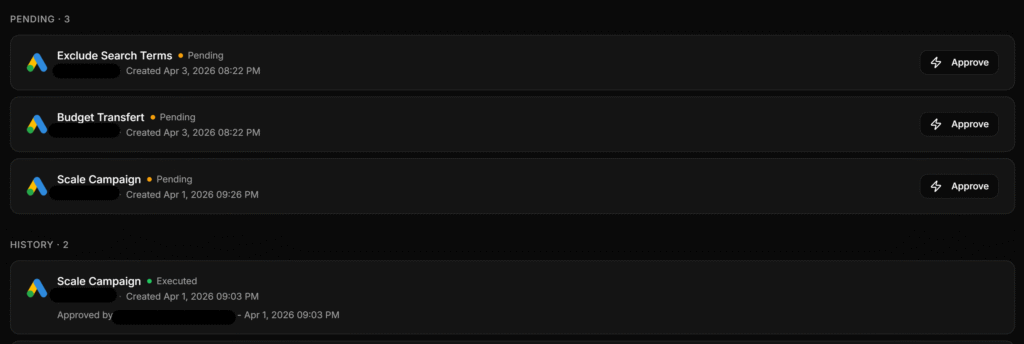
All actions are centralized in the Actions section of your project.
From this tab, you can:
- Review all pending actions
- Approve or reject recommendations
- Track actions that have already been executed
This gives you full visibility and control over everything Adsroid is doing on your account.
As shown in the image below.
The system will continuously monitor performance and suggest new optimizations.
Summary
To use Adsroid Copilot, make sure you are on the Scale plan, connect your Google and/or Meta Ads account, and switch from Manual to Copilot mode in your project settings.
Once activated, Adsroid starts assisting you immediately with actionable optimizations.
